



SINGAPORE: Singapore travellers can now use DBS PayLah! to pay at over 250,000 participating merchants across Taiwan, starting on Wednesday (Oct 21).
PayLah! users can scan eligible Taiwan QR codes (TWQR) from participating providers, including iPass Money, Taiwan Pay, PXPay Plus and Easy wallet, at merchants displaying the TWQR acceptance mark or QR payment notices bearing the TWQR label.
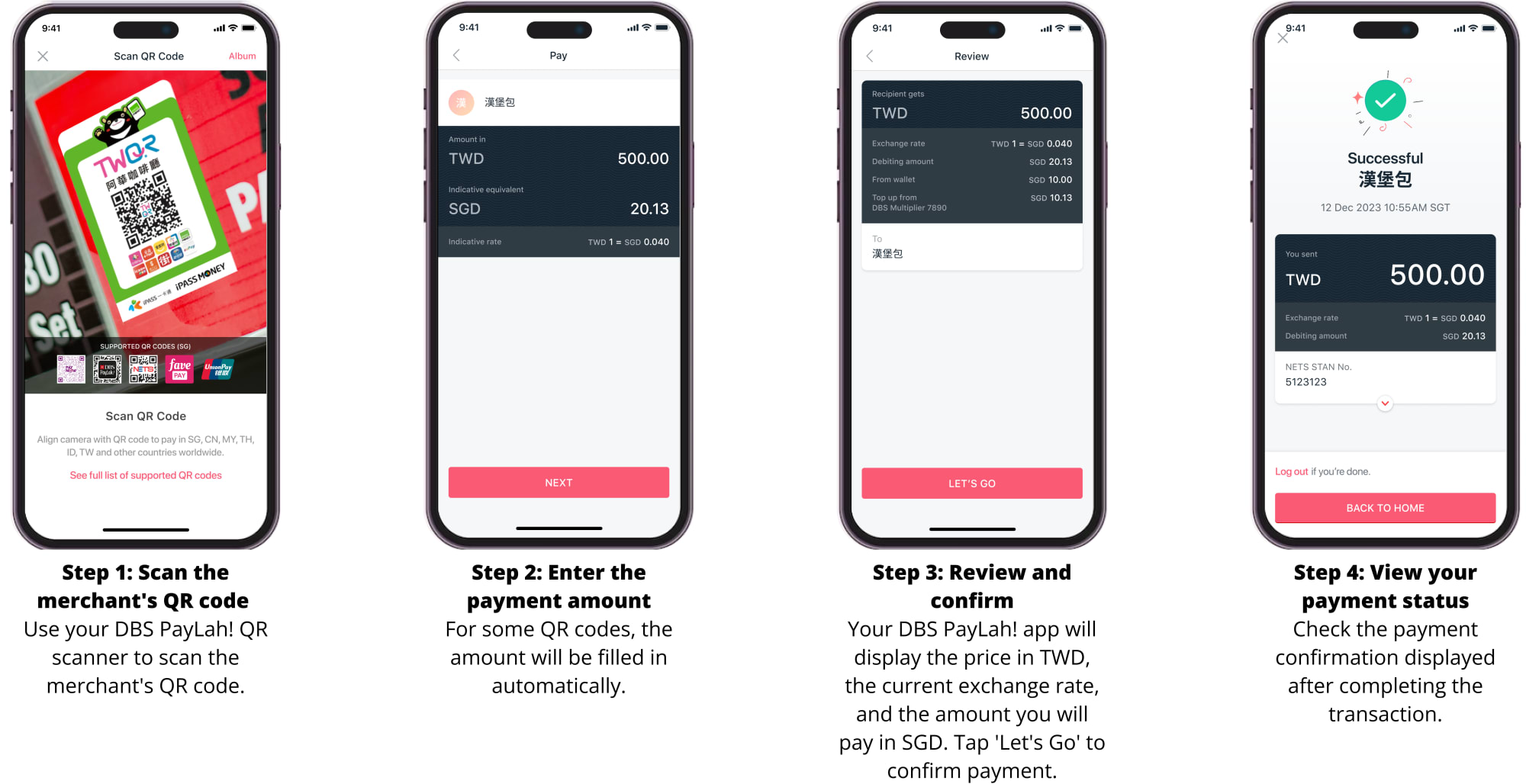
Users can pay by opening the latest version of the PayLah! app and scanning the QR code.
Before confirming payment, users can view the amount in Taiwan dollars, the applicable exchange rate and the final amount payable in Singapore dollars.
PayLah! is available to users without a DBS or POSB bank account.
The more than 250,000 participating merchants cover about two-thirds of the TWQR merchant network, with payment acceptance expected to expand as more TWQR providers come on board, DBS said.
These include night markets, local eateries and retailers at popular tourist destinations in Taiwan.
DBS is the first Singapore bank to connect its customers to Taiwan’s TWQR network, adding to its existing coverage across Indonesia’s QRIS, Malaysia’s DuitNow, Thailand’s PromptPay and UnionPay globally.
PayLah! users are expected to make QR payments across the full participating TWQR merchant network in 2027, including those bearing JKO Pay QR codes.
Separately, DBS customers in Taiwan are expected to be able to scan SGQR codes at participating merchants in Singapore using their digibank app in 2027.
DBS will also introduce a merchant-scan-customer payment option in Taiwan, allowing major retailers in Taiwan to scan PayLah! user QR codes.
“We’re working with partners to bring more of these systems within reach of our customers, so that paying overseas feels as familiar and straightforward as it does at home”, said Chan Sow Han, the head of payments and unsecured lending at DBS Singapore.
To encourage more travellers to use cross-border QR payments, DBS will offer cashback capped at S$3 to customers new to PayLah!’s overseas QR payment service.
From Nov 16, 2026, to Jan 31, 2027, eligible customers can receive cashback when they scan to pay in Taiwan, Malaysia, Thailand or Indonesia with no minimum spend required.
The launch brings to market the cross-border payment initiative announced in April 2026 between Singapore’s NETS and Taiwan’s Financial Information Service Co (FISC), which developed the TWQR network.
The launch also builds on strong travel ties between Singapore and Taiwan, with Singapore ranking among Taiwan’s top 10 visitor source markets in 2025.